Getting Started
Safe Merge installs in under 2 minutes via HubSpot's standard OAuth flow. No credit card required for the free tier.
Prerequisites
- An active HubSpot account: Free CRM or any paid Hub
- Super Admin access or sufficient permissions to install integrations and manage CRM properties
- Authority to connect third-party apps: confirm your IT policy allows it
Quick Install
Free tier available immediately. The Free plan includes 2,000 records, 3 unmerges/month, and 7-day snapshot retention. Upgrade anytime from your account dashboard.
Setup Guide: Install to First Snapshot
This is a comprehensive step-by-step walkthrough from installing Safe Merge to your first automated snapshot and duplicate detection run.
Step 1: Install Safe Merge
Visit safemerge.app and click "Install Free." HubSpot will ask you to authorize the required OAuth scopes. Select the portal you want to protect and click "Connect app."
Step 2: Log in to the Account Portal
After installation, go to safemerge.app/account. Click "Log in with HubSpot" to authenticate. This is your central dashboard for all Safe Merge settings, duplicate review, and billing.
Step 3: Configure Snapshot Protection
On the Account Portal, find the Snapshot Protection card. Here you will:
- Choose object types: Select which CRM objects to protect: contacts, companies, deals, or any combination.
- Limit to specific segments (optional): Click "Limit to specific segments" to pick specific HubSpot lists for each object type. Only records in those lists will be snapshotted. This helps you stay under your plan's record limit by focusing protection on your most important data. Leave empty to snapshot all records of that type.
- Choose your timezone: Select your timezone from the dropdown (e.g., "America/New_York").
- Choose your snapshot time: Pick the time you want your scheduled snapshot to run (e.g., 2:00 AM). Snapshot cadence is set by your plan (Free monthly, Starter and Growth weekly, Pro and Enterprise daily). We recommend choosing a time when your team is not actively working in HubSpot.
Step 4: Enable Snapshot Protection
Click "Enable Snapshot Protection" to opt in. Snapshot protection is not automatic on install. You must explicitly enable it. Once enabled, Safe Merge will run your first snapshot at the next occurrence of your chosen time.
Snapshot protection is opt-in. Nothing runs until you explicitly click "Enable Snapshot Protection." You are in full control of when and what gets snapshotted.
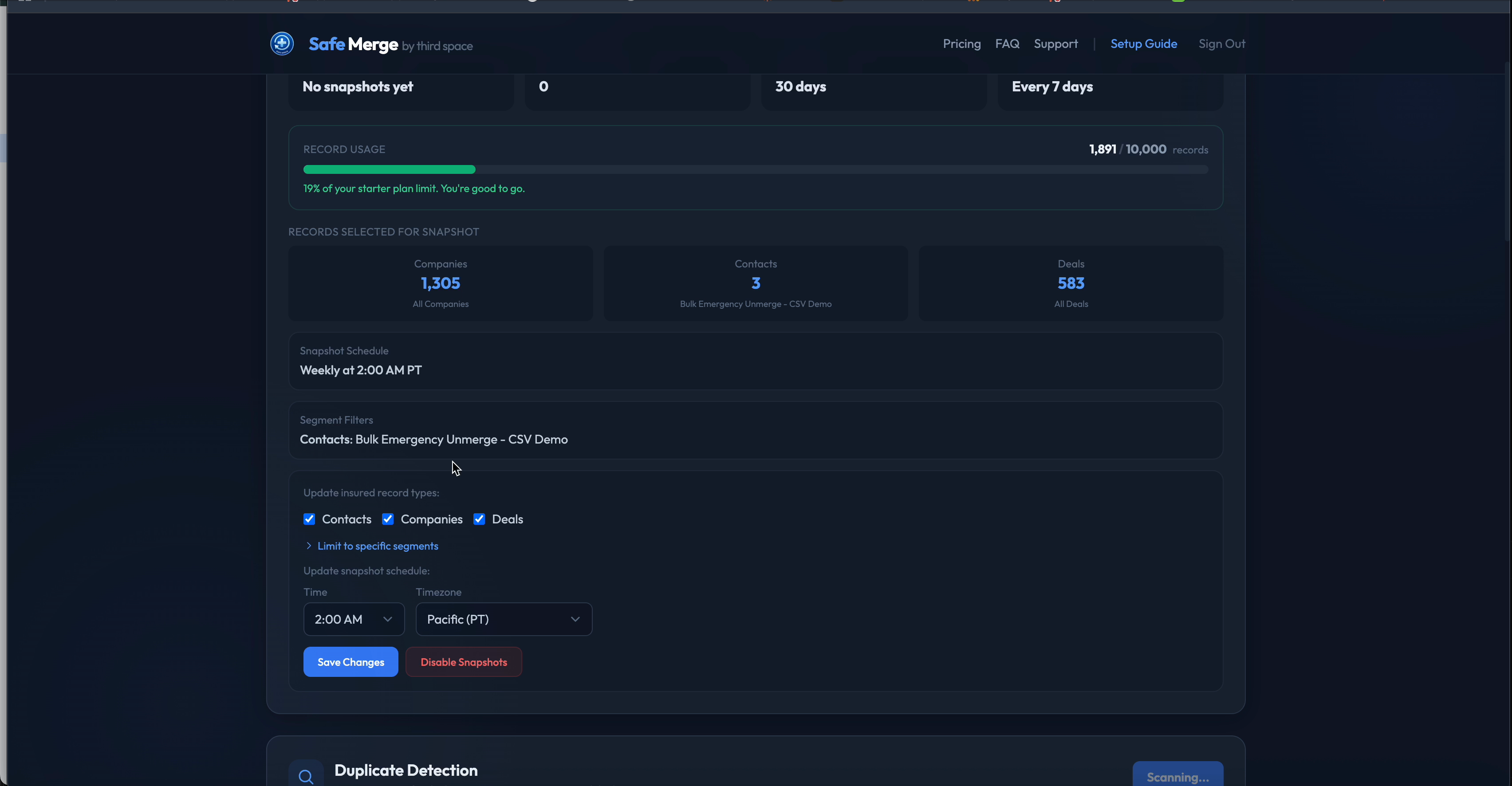
Configure snapshot schedule, enrolled objects, and segment filters from the web portal
Step 5: First Snapshot Runs
At your chosen snapshot time, Safe Merge will:
- Snapshot all records of your selected object types
- Run duplicate detection on the snapshotted records (rolling out)
- Display any detected duplicates in your Account Portal dedup dashboard
Step 6: Review Duplicates
After your first snapshot completes, visit the dedup dashboard in your Account Portal. You will see any detected duplicate pairs with match scores and reasoning. From there you can Safe Merge (with snapshot protection), dismiss false positives, or view the match reasoning.
Step 7: Ongoing Protection
From this point forward, Safe Merge runs automatically at your chosen time based on your plan's scan frequency. As duplicate detection rolls out, each snapshot will also trigger a fresh duplicate detection run, so new duplicates are surfaced continuously.
How Snapshots Work
Snapshots are the foundation of Safe Merge. They capture a complete, compressed JSON snapshot of every record's properties and associations, so any merge can be fully reversed.
Scheduled Snapshot at Your Chosen Time
Safe Merge runs an automated snapshot job at the time you configure in the Snapshot Protection settings. You choose both your timezone and your preferred snapshot time. The job checks each portal's scan schedule and runs snapshots for portals that are due:
| Plan | Scan Frequency |
|---|---|
| Free | Monthly (every 30 days) |
| Starter | Weekly (every 7 days) |
| Growth | Weekly (every 7 days) |
| Pro | Daily |
| Enterprise | Daily |
Automatic Duplicate Detection (rolling out)
As duplicate detection rolls out, it will run during each snapshot run on the snapshotted records, so you do not need to manually trigger scans. Detected duplicates are surfaced in the dedup dashboard after each snapshot cycle.
Incremental Snapshots
After the initial full snapshot, subsequent runs are incremental: only records modified since the last snapshot are re-captured. This keeps processing fast and efficient, even for large portals.
Where Snapshots Are Stored
- PostgreSQL database: The full compressed snapshot is stored server-side in our PostgreSQL database on Render (Oregon, US). The database runs on infrastructure with disk-level encryption, and application-layer encryption of snapshot contents is being rolled out.
- HubSpot property indicator: A lightweight custom property (
safe_merge_snapshot) is written to the record in HubSpot, marking it as protected and storing the snapshot timestamp. This allows the CRM card to instantly display protection status without an API call.
Snapshot Retention
Snapshots are retained based on your plan tier. Older snapshots are automatically pruned:
| Plan | Retention |
|---|---|
| Free | 7 days |
| Starter | 30 days |
| Growth | 90 days |
| Pro | 180 days |
| Enterprise | 365 days |
Snapshot before merge: When Safe Merge performs a duplicate merge, it always captures a fresh snapshot of both records immediately before merging, regardless of your scan schedule. This lets undo restore every property and association captured in that pre-merge snapshot.
Duplicate Detection (rolling out)
Safe Merge is rolling out a 3-stage duplicate detection pipeline to find duplicates across your contacts, companies, and deals. Each stage adds increasing sophistication, filtering candidates down to high-confidence pairs. As it rolls out, duplicate detection will run during each snapshot cycle.
Stage 1: Exact Matching
The first pass applies fast, exact-match rules to identify obvious duplicates:
- Exact email match: Two contacts with the same email address (case-insensitive)
- Exact phone match: Two contacts with the same phone number (normalized)
- Domain match: Two companies with the same website domain (normalized, stripping www/subdomains)
These pairs are flagged with high confidence (0.95+) and do not require further evaluation.
Stage 2: Fuzzy Matching
For records that do not match exactly, Safe Merge applies probabilistic record linkage based on the Fellegi-Sunter model:
- Jaro-Winkler distance for names: Catches typos, abbreviations, and name variations (e.g., "Jon Smith" vs. "Jonathan Smith")
- Phone digit normalization: Strips formatting and compares raw digit sequences (e.g., "(555) 123-4567" vs. "5551234567")
- TF-IDF company name similarity: Accounts for common words like "Inc", "LLC", "Solutions" that reduce match significance, while weighting distinctive terms higher
Pairs scoring above 0.70 advance to the next stage. Pairs scoring 0.95+ from Stage 2 are treated as confirmed duplicates.
Stage 3: Advanced Matching with Web Verification (Growth+ Plans)
For ambiguous pairs in the 0.70 to 0.95 score range, Safe Merge sends the pair to Anthropic's advanced pattern matching service for contextual evaluation:
- The service analyzes property patterns, naming conventions, and contextual signals
- Returns a match/no-match verdict with a confidence score and reasoning
- Handles edge cases like maiden names, company acquisitions, and name transliterations
For Growth, Pro, and Enterprise plans, this stage also adds web search verification for company duplicates:
- Company domain verification: Confirms two company names resolve to the same domain
- LinkedIn cross-reference: Checks LinkedIn company pages for matching data
- Acquisition detection: Identifies companies that merged or acquired each other (different names, same entity)
Privacy note: Only company-level data (name, domain) is sent for web search verification. No contact PII is ever sent to external search services.
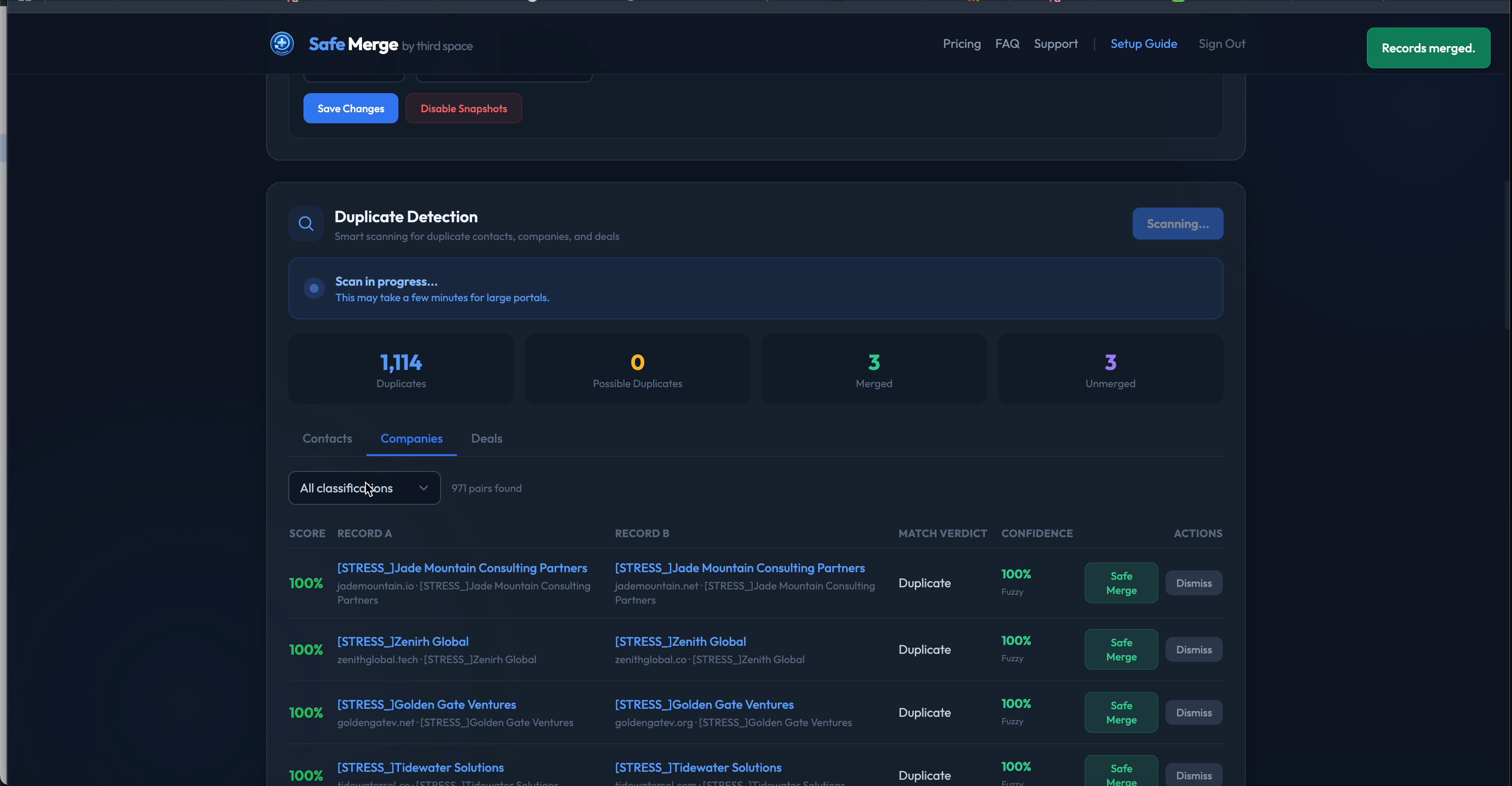
The dedup dashboard shows all detected pairs with match scores, verdicts, and one-click merge or dismiss actions
Dedup Dashboard
The dedup dashboard is your central hub for reviewing and acting on detected duplicates. Access it from your Account Portal.
Reviewing Duplicates
After each snapshot and duplicate detection run, detected pairs appear in the dedup dashboard. For each pair you can see:
- Match score: A confidence percentage indicating how likely the pair is a true duplicate
- Match reasoning: Explanation of why the records were flagged (e.g., "exact email match", "name similarity 0.92 + same company domain")
- Record details: Side-by-side comparison of key fields from both records
Actions
For each detected duplicate pair, you have three options:
- Safe Merge: Merge the records with full snapshot protection. A pre-merge snapshot is captured automatically, so you can undo the merge with one click if needed.
- Dismiss: Mark the pair as not a duplicate. Dismissed pairs will not appear again in future scans.
- View Reasoning: See the detailed match analysis, including which fields matched and the confidence breakdown.
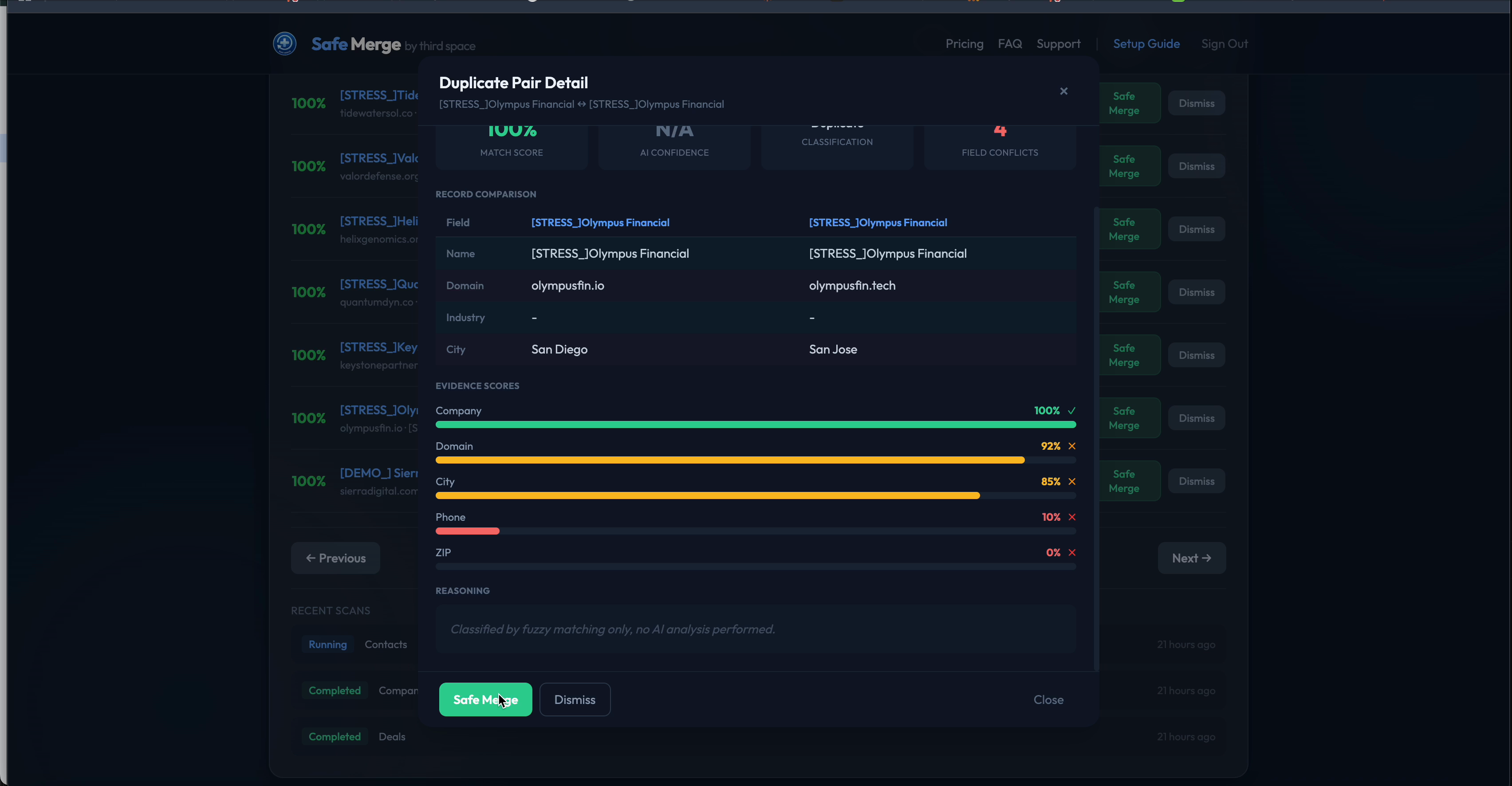
Review each pair with side-by-side property comparison and per-field match confidence scores
Unmerging from the Dashboard
If you merged a pair from the dedup dashboard and need to reverse it, merged pairs appear in your operations history. Click "Unmerge" to restore both records to their pre-merge state, restoring every property and association captured in the snapshot.
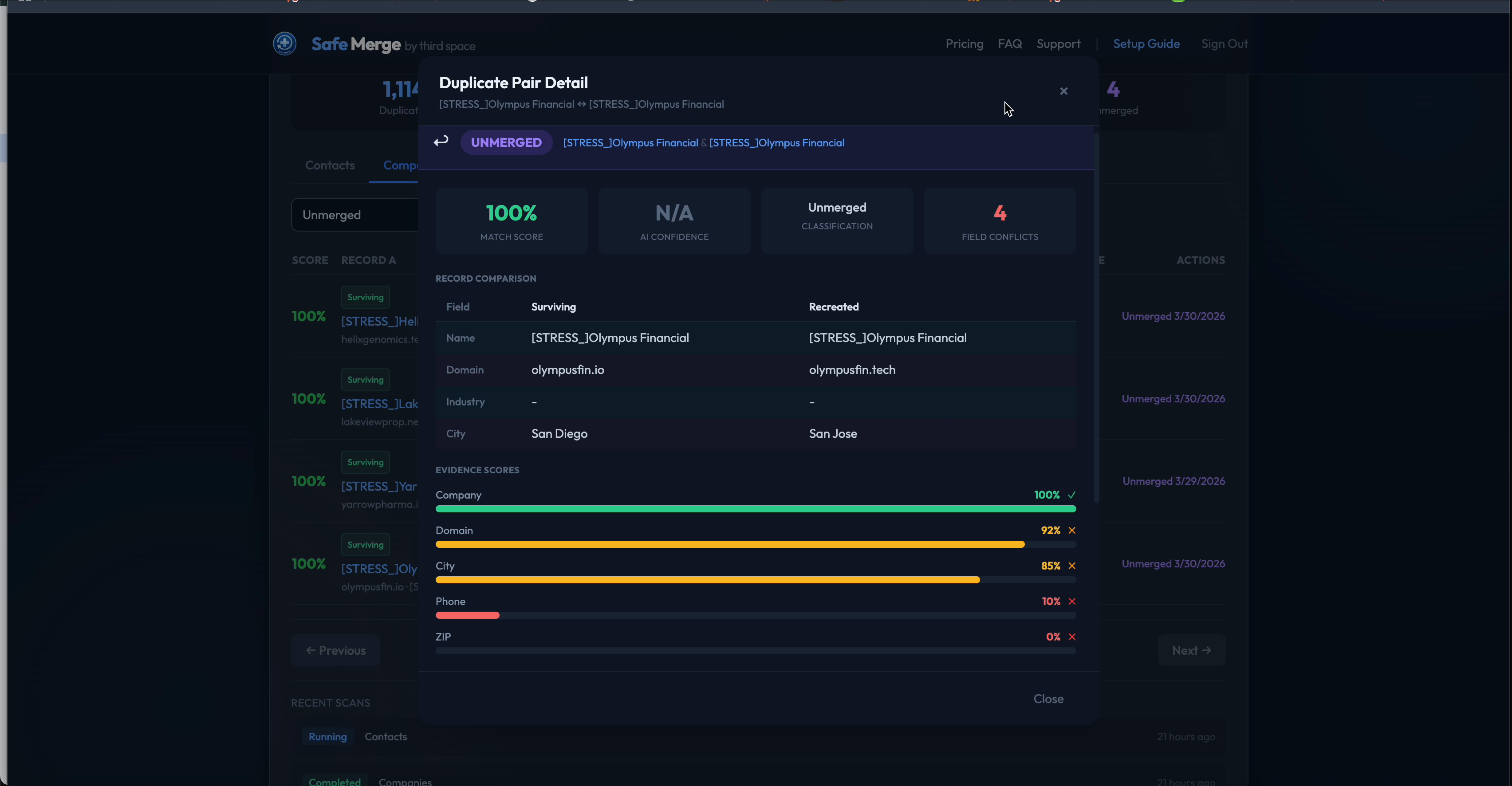
After unmerge, review the surviving and recreated records restored from the captured snapshot
Safe Merge with Undo
When Safe Merge identifies duplicates, you can merge them directly from the dashboard or CRM card with full undo capability.
How It Works
- Pre-merge snapshot: Before any merge, Safe Merge captures a complete snapshot of both records (all properties + all associations)
- Merge via HubSpot API: The merge is executed through HubSpot's native merge API, ensuring full compatibility with HubSpot's merge behavior
- Undo available immediately: After the merge completes, a one-click "Undo" button appears in the CRM card and on your account dashboard
One-Click Undo
If a merge needs to be reversed:
- Navigate to the merged record in HubSpot, or find the merge in your account dashboard
- Click "Undo Merge"
- Confirm in the dialog
- Processing takes 5 to 30 seconds
- Links to the restored records appear when complete
What Gets Restored
- All writable properties captured in the pre-merge snapshot
- All associations: contacts, companies, deals, notes, tasks, calls, emails, meetings
- Read-only properties stored in a
safe_merge_readonly_valuesmirror property for reference - Surviving record cleanup: absorbed associations are removed and the surviving record is restored to its pre-merge state
Safe Merge supports undo for contacts, companies, and deals.
Chain Merges
If a record was merged multiple times, Safe Merge handles it automatically with timestamp-aware snapshot matching. All abolished records are shown in the sidebar card and can be individually restored.
Time-sensitive: Undo relies on the pre-merge snapshot. The sooner you undo, the better. Associations or properties changed after the merge but before the undo are not captured in the original snapshot.
Account Dashboard
The web portal at safemerge.app/account is your central hub for managing Safe Merge.
Dashboard Sections
- Snapshot Protection: Configure which object types to protect, your timezone, and your preferred snapshot time. Optionally limit snapshots to specific HubSpot segments (lists) per object type. Enable or disable snapshot protection.
- Snapshot Status: See when your last snapshot ran, how many records are protected, and when the next snapshot is scheduled
- Dedup Dashboard: View detected duplicate pairs, filter by object type (contacts/companies/deals), review match scores and reasoning, and approve or dismiss pairs
- Operations History: Complete log of all merges, unmerges, and snapshot operations with timestamps, status, and details
- Billing Management: Current plan, record usage, upgrade/downgrade options, and a link to the Stripe billing portal for invoices and payment methods
- Emergency Unmerge Credits: Current credit balance and purchase options (paid Safe Merge plans include a monthly EU allowance)
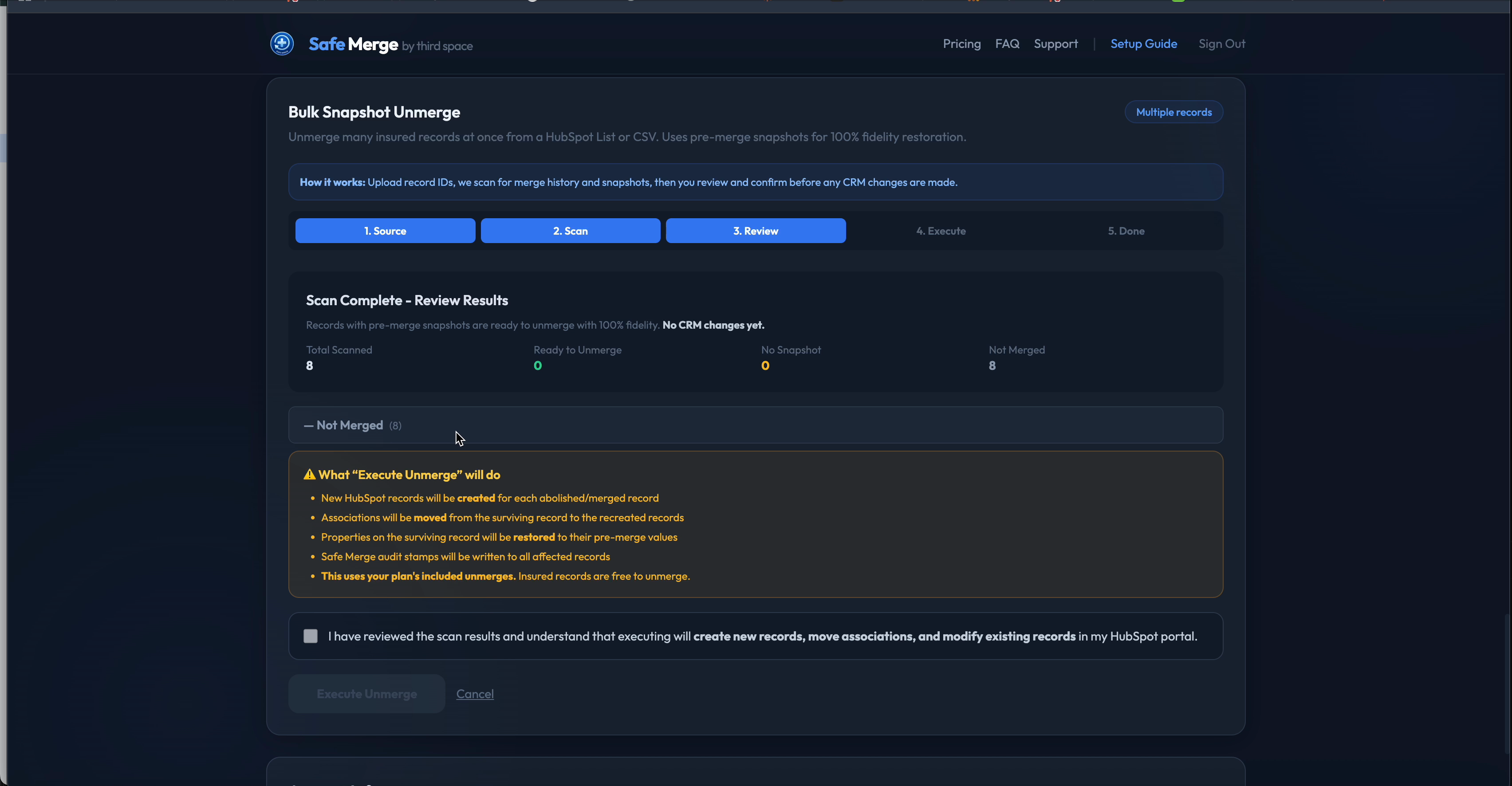
Bulk operations let you scan and unmerge multiple records from a HubSpot list or CSV upload
Cancellation
- Cancel anytime from the Stripe billing portal (linked from your Account page)
- Takes effect at the end of the current billing period
- Unmerge is disabled immediately; snapshots continue for a 14-day grace period
- After the grace period, your portal reverts to Free tier limits
No refunds. All payments and credit purchases are final. We do not refund partial periods or unused credits. If you have a service issue, contact joshua@thirdspaced.com. We can offer service credits or complimentary time.
HubSpot CRM Cards
Safe Merge installs two CRM cards on every contact, company, and deal record in your HubSpot portal.
SafeMergeCard (Sidebar Card)
The sidebar card appears in the right panel of every record and shows:
| State | Meaning | Action |
|---|---|---|
| Protected | Snapshot exists, no merge detected | None needed |
| Merge Detected | Record was merged and a pre-merge snapshot exists | One-click Undo Merge |
| Merged (No Snapshot) | Merged before Safe Merge was installed | Emergency Unmerge |
| No Snapshot Yet | Waiting for first snapshot cycle | Wait for next scheduled run |
The card also displays any detected duplicate pairs for the current record, with match scores and a direct link to review/merge them.
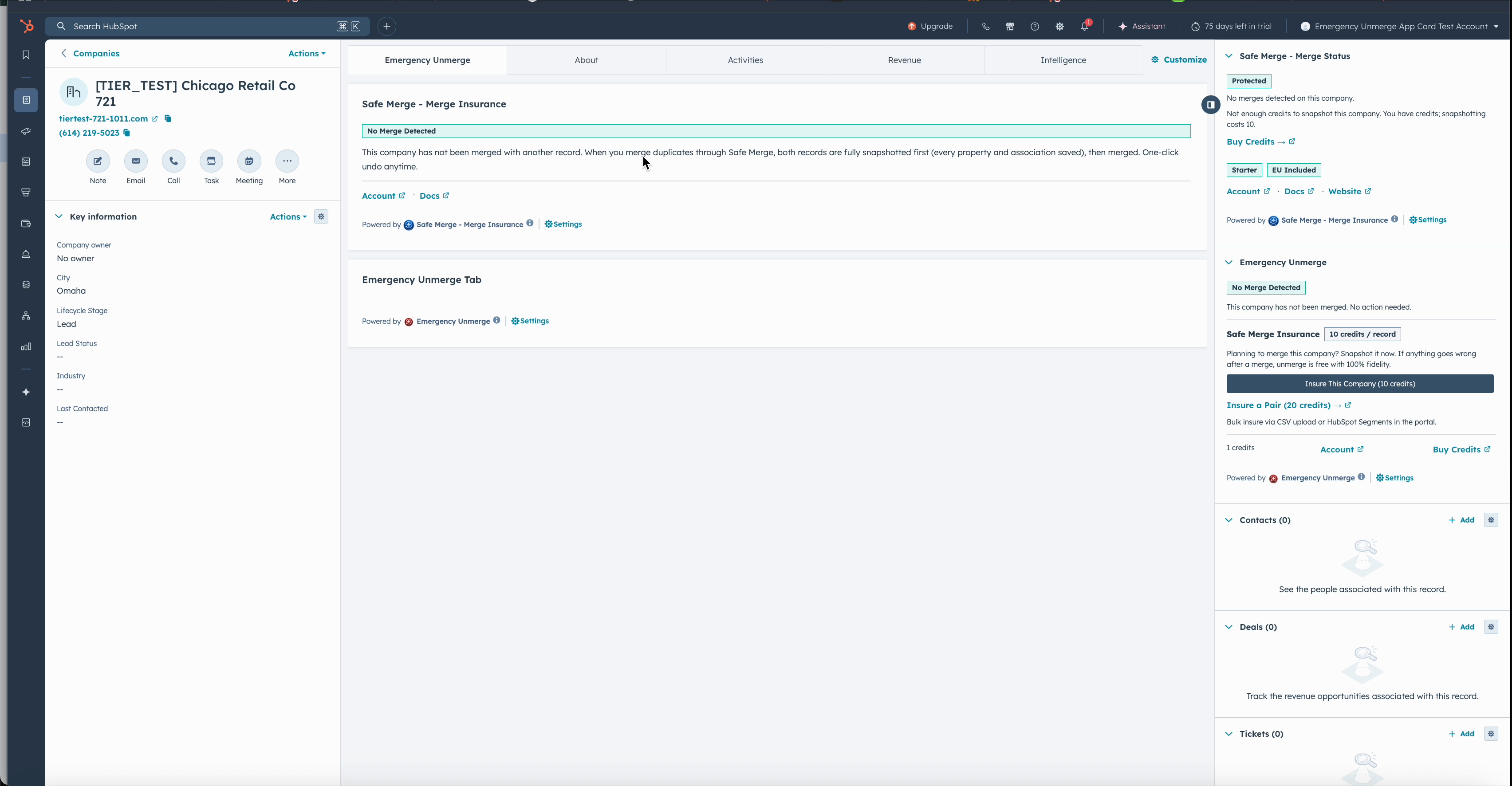
The sidebar card and tab card appear on every contact, company, and deal record in HubSpot
SafeMergeTabCard (Unmerge Workflow)
The tab card provides the full unmerge workflow when a merge is detected:
- Snapshot-based unmerge: One-click restore from the pre-merge snapshot
- Emergency Unmerge: For records merged before Safe Merge was installed, launches the reconstruction workflow (scan, review, execute)
- Operation status: Shows progress for in-flight unmerge operations
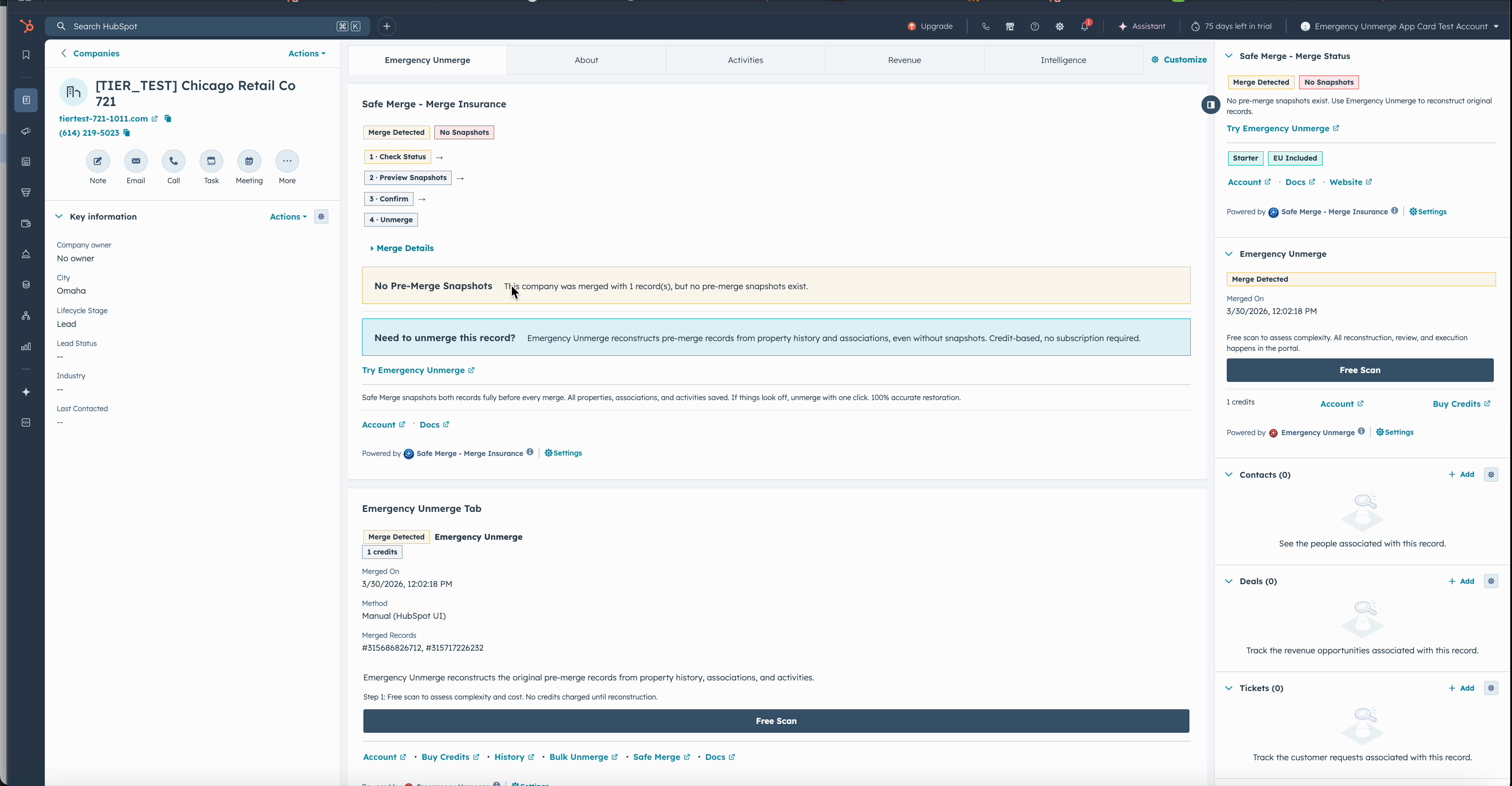
When a merge is detected, the tab card shows full details and lets you preview snapshots or execute an unmerge
Pricing & Plans
| Feature | Free | Starter | Growth | Pro | Enterprise |
|---|---|---|---|---|---|
| Price | $0 | $29/mo | $79/mo | $179/mo | $349/mo |
| Record Limit | 2,000 | 10,000 | 50,000 | 250,000 | 1,000,000 |
| Unmerges / Month | 3 | Unlimited | Unlimited | Unlimited | Unlimited |
| Snapshot Retention | 7 days | 30 days | 90 days | 180 days | 365 days |
| Scan Frequency | Monthly | Weekly | Weekly | Daily | Daily |
| Duplicate Detection (rolling out) | Exact + Fuzzy | Exact + Fuzzy | + Web Search (250 pairs/scan) | + Web Search (500 pairs/scan) | + Web Search (1,000 pairs/scan) |
| EU Operations/mo | 0 (credits required) | 10 included | 25 included | 50 included | Unlimited |
| Support | Community | Priority email | Dedicated | Dedicated |
Annual billing saves up to 29%. All prices are in US dollars and exclude applicable taxes.
Every paid plan includes Emergency Unmerge operations. Starter (10/mo), Growth (25/mo), Pro (50/mo), Enterprise (unlimited). Additional operations beyond the monthly allowance use standard credits.
Emergency Unmerge Integration
Emergency Unmerge is a separate product by Third Space that reconstructs records merged before Safe Merge was installed, when no pre-merge snapshot exists.
How It Works
- Deep scan: Reads all properties, associations, and engagement history on the merged record (30 to 120 seconds)
- Reconstruction: Anthropic's advanced pattern matching service analyzes property history, timestamps, association patterns, and email domain forensics to reconstruct the probable pre-merge state
- Human review: You review the proposed reconstruction side-by-side, with confidence scores for every property. Edit any field before executing.
- Execution: Only after your explicit approval are new records created in HubSpot
Cross-Product Benefit
Any paid Safe Merge subscription includes a monthly allowance of Emergency Unmerge operations:
- Starter: 10 EU operations/month included
- Growth: 25 EU operations/month included
- Pro: 50 EU operations/month included
- Enterprise: Unlimited EU operations included
Operations within the monthly allowance require no credits. Operations beyond the allowance use standard credit rates ($0.05/credit for Starter, $0.04/credit for Growth and above). Allowances reset on the first of each month and do not roll over.
Free plan users can use Emergency Unmerge by purchasing credits. See the Emergency Unmerge documentation for complete details on credits and pricing.
Emergency Unmerge is probabilistic. Reconstructions are a best guess based on available data. Always review carefully before executing. See Terms of Service.
Emergency Unmerge Credits (Free Plan)
| Package | Credits | Price | Per Credit |
|---|---|---|---|
| Per-Credit (under 250) | 100 to 249 | $0.05 x qty | $0.05 |
| Per-Credit (250+) | 250+ | $0.04 x qty | $0.04 |
| Emergency | 100 | $4.99 | $0.05 |
| Emergency 250 | 250 | $9.99 | $0.04 |
| Emergency Plus | 500 | $19.99 | $0.04 |
Credit Cost by Record Complexity
| Complexity (total items) | Credits Used |
|---|---|
| 0 to 25 items | 10 |
| 26 to 100 items | 22 |
| 101 to 500 items | 50 |
| 501 to 2,000 items | 125 |
| 2,001 to 5,000 items | 250 |
| 5,001 to 10,000 items | 500 |
| 10,000+ items | 850 |
- The exact cost is shown before confirmation. Credits are only deducted on successful execution.
- All purchases are final and non-refundable
- Non-transferable between portals
- Expire 12 months after purchase
OAuth Scopes Explained
Required Scopes
| Scope | Why We Need It |
|---|---|
crm.objects.contacts.read | Read contact properties for snapshots, merge detection, and duplicate scanning |
crm.objects.contacts.write | Create new contact records during unmerge; write snapshot indicator properties |
crm.objects.companies.read | Read company properties for snapshots, merge detection, and duplicate scanning |
crm.objects.companies.write | Create new company records during unmerge; write snapshot indicator properties |
crm.objects.deals.read | Read deal properties for snapshots and merge detection |
crm.objects.deals.write | Create new deal records during unmerge; write snapshot indicator properties |
crm.schemas.contacts.read | Read contact property definitions to know which fields to snapshot |
crm.schemas.contacts.write | Create Safe Merge custom properties on contacts |
crm.schemas.companies.read | Read company property definitions |
crm.schemas.companies.write | Create Safe Merge custom properties on companies |
crm.schemas.deals.read | Read deal property definitions |
crm.schemas.deals.write | Create Safe Merge custom properties on deals |
oauth | Required for OAuth token refresh |
Optional Scopes
| Scope | Why |
|---|---|
tickets | Read ticket associations during Emergency Unmerge (if present) |
e-commerce | Read e-commerce associations during Emergency Unmerge |
Optional scopes are only used during Emergency Unmerge to provide richer data for reconstruction analysis. You can decline them and still use all core features.
Shared Data Flow
Data flows bi-directionally for contacts, companies, and deals:
- HubSpot to Safe Merge: Property values, associations, and merge history are read for snapshot creation, merge detection, and duplicate scanning
- Safe Merge to HubSpot: New records are created during unmerge; snapshot indicator properties are written; associations are created and removed during unmerge operations; merges are executed via HubSpot's merge API
Data Handling & Security
Where Your Data Lives
| Data | Location | Retention |
|---|---|---|
| CRM snapshots | PostgreSQL on Render (Oregon, US) + lightweight indicator on HubSpot record | Per plan tier (7 to 365 days) |
| Duplicate detection results | PostgreSQL on Render | Until dismissed or merged |
| OAuth tokens (encrypted) | PostgreSQL on Render | Duration of integration |
| Billing records | Stripe | 7 years (legal) |
| Emergency Unmerge scan data | PostgreSQL on Render | Auto-deleted after 30 days |
| Advanced matching processing (Anthropic) | Anthropic servers | Deleted within 30 days |
Security Measures
- Data is encrypted in transit with TLS 1.2+ for all API traffic
- The database runs on infrastructure with disk-level encryption
- OAuth tokens are encrypted at the application layer today (Fernet / AES-128-CBC + HMAC-SHA256)
- Application-layer encryption of snapshot contents is being rolled out
- Database access restricted to application service only
- HTTPS enforced with HSTS headers
- Sentry error monitoring with PII sending disabled
- Render.com SOC 2 Type II certified infrastructure
- Your CRM data is never used to train models (per Anthropic Commercial Terms)
For complete details, see our Privacy Policy, Data Processing Agreement, and Security pages.
Troubleshooting
"No Snapshot Yet" on the Sidebar Card
This means the record has not been captured in a snapshot cycle yet. Snapshots run on a schedule based on your plan tier (monthly for Free, weekly for Starter/Growth, daily for Pro/Enterprise). The record will be picked up in the next scheduled cycle automatically. If you just installed Safe Merge, make sure you have enabled Snapshot Protection in the Account Portal and the first snapshot will run at your chosen time.
"Token Expired" or Authorization Errors
If Safe Merge loses access to your HubSpot portal, the CRM card may show an authorization error. To resolve:
- Go to HubSpot Settings → Integrations → Connected Apps
- Find Safe Merge and disconnect it
- Reinstall from safemerge.app
- Your account data (plan, history, credits) will be automatically reconnected
"Scan Running": Duplicate Scan Already in Progress
Safe Merge processes one duplicate scan at a time per object type. If a scan is already running for contacts, you cannot start another contact scan until it completes. Scans typically complete within a few minutes for most portals. Large portals (100k+ records) may take longer.
Unmerge Button Is Disabled
Possible causes:
- Monthly limit reached: Free plan allows 3 unmerges/month. Upgrade or wait until the next billing cycle.
- Payment failed: Unmerge is disabled immediately when payment fails. Update payment at safemerge.app/account.
- No merge detected: The record has no
hs_merged_object_ids. It may not have been merged, or HubSpot may not have recorded the merge.
Unmerge Completed but Some Associations Are Missing
Possible reasons:
- Association was created after the last snapshot: Safe Merge restores from the snapshot. Associations added between the snapshot and the merge are not captured.
- HubSpot rate limits: Extremely complex records (hundreds of associations) may hit HubSpot API rate limits. Wait a few minutes and check again.
Properties Show as "Read-Only Mirror"
Certain HubSpot properties (e.g., createdate, hs_analytics_source) are system-managed and cannot be written by any integration. Safe Merge stores these values in safe_merge_readonly_values so you have a reference.
Sidebar Card Shows an Error
Try refreshing the page. If the issue persists, it may be a temporary API issue. Contact joshua@thirdspaced.com with your portal ID and the record URL.
Frequently Asked Questions
Does Safe Merge work with HubSpot Free CRM?
Yes. Safe Merge works with all HubSpot tiers, including the free CRM.
Do snapshots start automatically when I install?
No. After installing, you need to go to safemerge.app/account, configure your object types, timezone, and snapshot time, then click "Enable Snapshot Protection." Nothing runs until you opt in.
Can I unmerge records that were merged before I installed Safe Merge?
Yes, that is what Emergency Unmerge is for. It uses advanced reconstruction to determine the probable pre-merge state, even without a snapshot. Paid Safe Merge subscribers get Emergency Unmerge for free.
Is my data safe?
Snapshots are stored in our PostgreSQL database, with a lightweight indicator property written to your HubSpot records. Data is encrypted in transit, the database runs on infrastructure with disk-level encryption, and application-layer encryption of snapshot contents is being rolled out. OAuth tokens are encrypted at the application layer today. Our infrastructure is SOC 2 Type II certified. Your data is never used to train models. See our Privacy Policy and Security page.
What happens if I uninstall Safe Merge?
Your CRM data is unaffected. Custom properties remain on your records (you can delete them manually in HubSpot Settings → Properties). Our stored data (tokens, snapshots, logs) is deleted within 30 days.
Does Safe Merge work with custom objects?
Currently, Safe Merge supports contacts, companies, and deals. Custom object support is on our roadmap.
How is this different from a CRM backup tool?
Safe Merge is purpose-built CRM backup and recovery for the things HubSpot calls permanent. Its superpower is recovery: it can rebuild a record absorbed by a HubSpot-UI merge and clear contamination on the survivor, and it can recover merges and deletes done in HubSpot itself. Automated snapshots are the recurring protection layer underneath, capturing pre-merge state so a merge done through Safe Merge can be undone in one click. A 3-stage duplicate detection pipeline is rolling out on top.
How does duplicate detection differ from HubSpot's built-in tool?
HubSpot's built-in duplicate tool uses basic matching. Safe Merge's duplicate detection (rolling out) adds Fellegi-Sunter probabilistic scoring, advanced matching for ambiguous pairs, and web search verification for companies. Most importantly, when you merge a duplicate through Safe Merge you can undo that merge with one click, and for merges and deletes done in HubSpot itself Safe Merge can recover the records, something HubSpot's native merge does not offer.
Can I get a refund?
No. All subscription payments and credit purchases are final and non-refundable. If you experience a genuine service issue, contact support and we can provide service credits or complimentary time as appropriate. See Terms of Service, Section 3.6.
Support
| Plan | Support Level | Channel |
|---|---|---|
| Free | Community | Support form |
| Starter | Email (business hours) | joshua@thirdspaced.com |
| Growth | Priority email | joshua@thirdspaced.com |
| Pro | Dedicated | joshua@thirdspaced.com |
| Enterprise | Dedicated | joshua@thirdspaced.com |
When contacting support, include:
- Your HubSpot Portal ID
- The URL of the affected record (if applicable)
- A description of the issue and any error messages
Third Space, LLC
Email: joshua@thirdspaced.com
Website: https://safemerge.app